New to government contracts? Get help choosing where to start.
Find government contracts that fit your small business
Stop sorting through notices that aren’t right for you. FedPath finds federal contracts that match your work, explains what each one asks for, and helps you decide which are worth your time.
Free betaEverything here is free to use without an account. Accounts are by invitation: request free beta access.
Why finding government contracts is hard
Too many notices
Thousands of federal notices are open at any time, for everything from paint to software.
Hard words
Notices use terms like set-aside, NAICS and solicitation, and come with long documents.
Hard to tell what fits
A contract can sound right but need experience, a certification or a location you don’t have.
Not enough time
You’re running a business. You can’t spend hours every day searching.
FedPath helps you spend less time searching and more time on the opportunities that could fit.
How FedPath works
Tell us about your business
Answer two quick questions about your work and where you work, or skip them and search. Signed in, your company profile adds your industry codes (NAICS), certifications and capabilities. You can import it from SAM.gov, and manage several companies or registrations (UEIs) from one sign-in.
See matching opportunities
Search every open SAM.gov notice in plain words, or let an Opportunity Watch find new ones for you. Each match says what lined up, what didn’t and what’s still unknown. A match means the work looks like yours, not that you can bid.
Understand the opportunity
Each notice is explained: what the agency is buying, where, when it’s due and who can compete. Fit Analysis compares it with your profile and lists matches, gaps, blockers and unknowns.
Decide what to pursue
Move from opportunity to Fit Analysis, a Go/No-Go decision, a pursuit and a requirements checklist. FedPath keeps the decision organized. You decide whether you can bid and whether to bid.
A match means an opportunity looks relevant, not that your business is eligible. Only the agency decides who can be awarded a contract.
See it working
Find contracts that match your business
Tell FedPath what you do and where you work. It checks SAM.gov every day and lists the opportunities that fit, each with the reasons it matched.
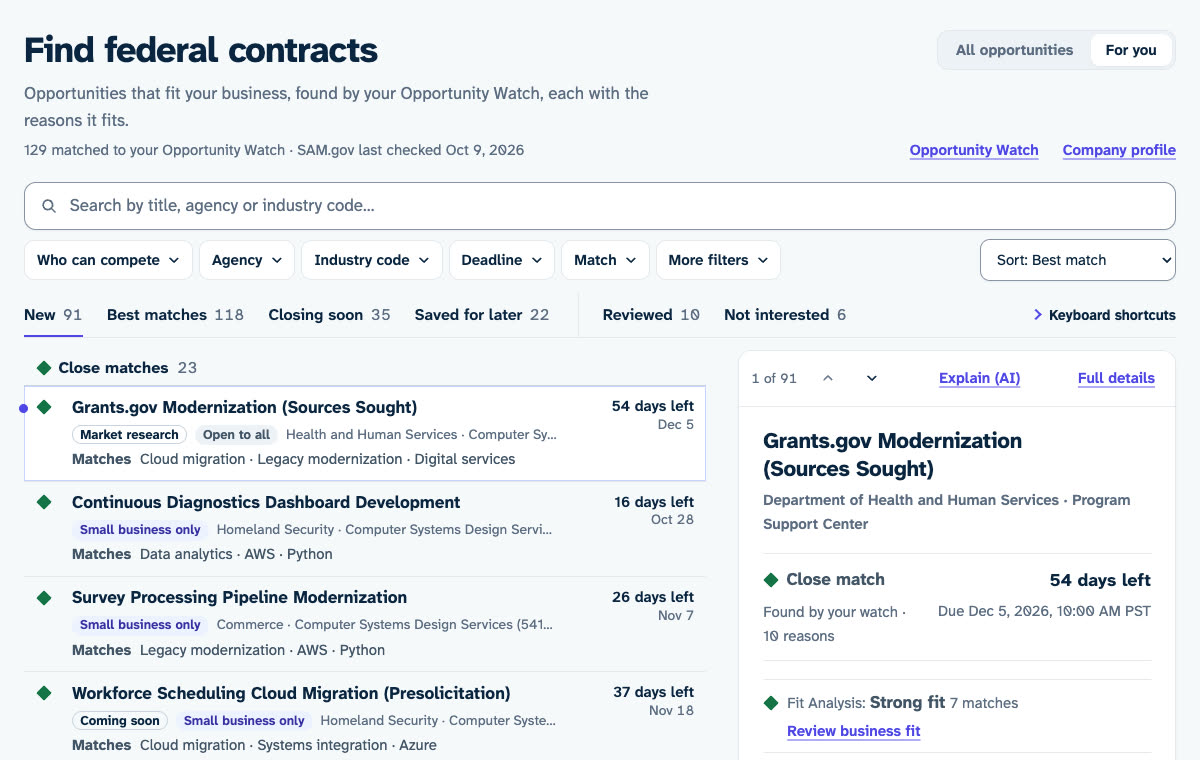 (opens full size in a new tab)
Example: a small cleaning company looks for federal work
Hypothetical: Sunrise Cleaning has five employees in Sacramento, California, and cleans offices. The steps are real; the details are illustrative, not a live search.
Search for cleaning work
Search “janitorial”. Then try “custodial” and “building cleaning”, because agencies use different words.
Narrow to the right services
Filter by industry code 561720, Janitorial Services.
Check where the work is
Keep notices in California that are close enough to drive to.
Check who can compete
Keep small business set-asides and open competitions. Skip notices reserved for a program Sunrise isn’t in, such as HUBZone (for businesses in certain low-income areas).
Check size and scope
One notice covers two buildings. Another covers 30 buildings in three states. The first is realistic for five people.
Check the deadline
Keep notices due in more than two weeks, so there’s time to visit the site and price the work.
Open the best one
Open it in FedPath, run a Fit Analysis, and record a Go/No-Go decision.
Filters shorten the list. They don’t prove you can bid, so read the notice and its documents before you decide.
FedPath and SAM.gov: how they work together
SAM.gov is the official U.S. government website for federal contract opportunities. Anyone can search it for free, without an account.
FedPath doesn’t replace SAM.gov. It copies SAM.gov’s public notices once a day. Then it helps you find the ones that fit, understand them and track your decisions. Every opportunity links back to its official notice.
| What you need | SAM.gov | FedPath |
|---|---|---|
| The official source | Yes | No. FedPath is independent and links to SAM.gov |
| Search open opportunities | Yes, free | Yes, free, no account needed |
| Filter by industry, set-aside, place and deadline | Yes | Yes, with plain-English labels |
| Saved searches and email updates | Yes, with a SAM.gov account | Opportunity Watch and the Opportunity Brief |
| Matches based on your business | You choose the filters | Matches from your company profile, with the reasons |
| Plain-English explanation | The agency’s notice and documents | A plain summary of each notice, linked to the source |
| Check the fit with your business | You compare by hand | Fit Analysis: matches, gaps, blockers and unknowns |
| Bid decision and tracking | Not part of SAM.gov | Go/No-Go, pursuits, deadlines and a requirements checklist |
| Register your business | Yes. Most awards require it | No. FedPath’s checklist helps you prepare |
Always check the official notice and its documents on SAM.gov before you bid. Search contract opportunities on SAM.gov (opens SAM.gov in a new tab)
Government contract alerts
You don’t have to search every day. These work today:
Opportunity Watch
Describe your work once. FedPath checks new SAM.gov notices every day and adds matches to your list, with the reason each one matched.
Free: 1 watch. Paid plans: 5 or more.
Opportunity Brief
An email in plain English: new matches, deadlines coming up and changes to opportunities you saved. You can also read it in FedPath.
Free: weekly. Paid plans: daily.
Change monitoring
When an opportunity you’re pursuing changes, such as a new deadline or an amendment, FedPath tells you what changed.
Free: in a daily digest. Paid plans: alerts as changes are found.
Learn the basics
- How to find government contracts for your small businessA step-by-step guide you can follow on SAM.gov, free.
- NAICS codes, explainedThe industry codes that decide which contracts and size rules apply.
- Contracts under $350,000Why most smaller federal contracts are reserved for small businesses.
- Free bid/no-bid toolFound one? Check what could stop you before you spend days on a proposal.
Common questions
How do small businesses find government contracts?
Most federal contract opportunities are posted on SAM.gov, the official government website, and anyone can search it for free. Search by words for your work and your industry code, then narrow by who can compete, place and deadline. Tools like FedPath match notices to your business and explain them.
Is SAM.gov free to use?
Yes. Searching contract opportunities and registering your business on SAM.gov are both free. Be careful of companies that charge to register you.
Do I need to register in SAM.gov?
Not to search. You need an active SAM.gov registration to win most federal contracts, and it takes time, so start early. FedPath’s free checklist walks you through it.
Can a new business win government contracts?
Yes. Many contracts don’t require federal experience, and smaller contracts are often reserved for small businesses. Some solicitations do ask for past performance, so read each one.
What is a NAICS code?
A six-digit code for a type of work, such as 561720 for janitorial services. Each federal notice lists one, and it decides which size limit applies.
What is a small business set-aside?
A contract only small businesses can bid on. Some set-asides are limited further, for example to women-owned, veteran-owned, HUBZone or 8(a) businesses.
How do I know whether a contract fits my company?
Check what the agency is buying, where the work is, who can compete, the deadline, and any required experience, licenses or certifications. FedPath’s Fit Analysis lists these for you, but you make the final call.
Can I find government contracts near my business?
Yes. Each notice lists a place of performance. Filter by state on SAM.gov or FedPath, and tell FedPath where you work so matches stay nearby.
Do I need government contracting experience?
No. You need to understand what each notice asks for. FedPath explains notices in plain English, and free APEX Accelerator counselors can help too.
What does government contract finder software do?
It searches federal notices for you, matches them to your business and helps you track what you decide. It doesn’t replace SAM.gov or decide whether you can bid. Most tools, including FedPath, start from SAM.gov’s public data.
Does a match mean I qualify?
No. A match means the work looks like yours. Each result lists what to check, such as who can compete, required certifications or licenses, and where the work is.
Your next government contract could start with a better search
You don’t need a business development team to explore federal work. Find work that fits, see what it asks for, and decide what makes sense for your business.
Free to explore, no account needed. FedPath is independent. It is not affiliated with, endorsed by, or part of the U.S. government, the Small Business Administration (SBA), SAM.gov, or any federal agency.